Jarvis
An AI assistant for solo travelers.
Jarvis is and AI with voice to text to text to voice interface for people who are traveling (e.g. by car) and want information about their surroundings, such as proximity of gas stations, history of towns they are traveling though, or similar.
Controls from the top left are:
- Extra Details: Expands panel with extra readings and controls.
- Type: Expands panel that allows user to type messages instead of saying them.
- Sensitivity: Toggles touch sensitivity between 'default' (user must tap a blank space in the message panel, not a message bubble for Jarvis to start listening) and 'sensitive' (user must tap any space in the message panel for Jarvis to start listening).
- Wake lock: Toggle between 'default' and 'keep display on' mode of the device.
- Debug: Toggle between 'default' (no debug messages shown) and 'debug' (all debug messages shown) mode.
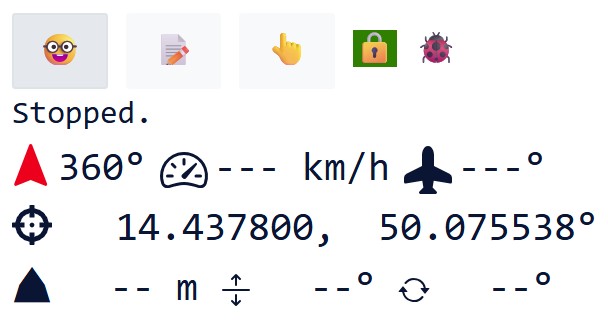
Readings from the top left are:
- Status line: Reports current status
- Azimuth: Reports angle measured clockwise from the magnetic north.
- Speed: Current speed in km/h
- Heading: Angle measured clockwise from the devices' 0 (default) position.
- Altitude: Altitude in m above the sea level.
- Pitch: Angle above or below (negative) the devices' 0 (default) horizon.
- Roll: Angle measured clockwise from devices' 0 (default) roll position.
Just talk to Jarvis as you would talk to a tour guide. You can ask Jarvis questions like:
- What is the name of the village I am traveling through now?
- Can you navigate me to the nearest gas station?
- What is a brief history of the town I am going through?
In addition to regular conversation, Jarvis understands the following strict phrases:
click: Click on the first link from the top without touching the screen. Synonyms:tap,click that link, and a few others.repeat: Makes Jarvis UI re-read the last message. Synonyms:say again,read again, and a few others.set language: You can set a different language by sayingset languageand following it with the name of the language to set. For example, saying 'Set language', 'Czech language' should make Jarvis switch to Czech language. Note that support of other than English language is experimental at this point. Synonyms:select language,listen in, and few others.stop listening: Just stop listening. You'll need to tap Jarvis again once you want Jarvis to listen to start listening again.